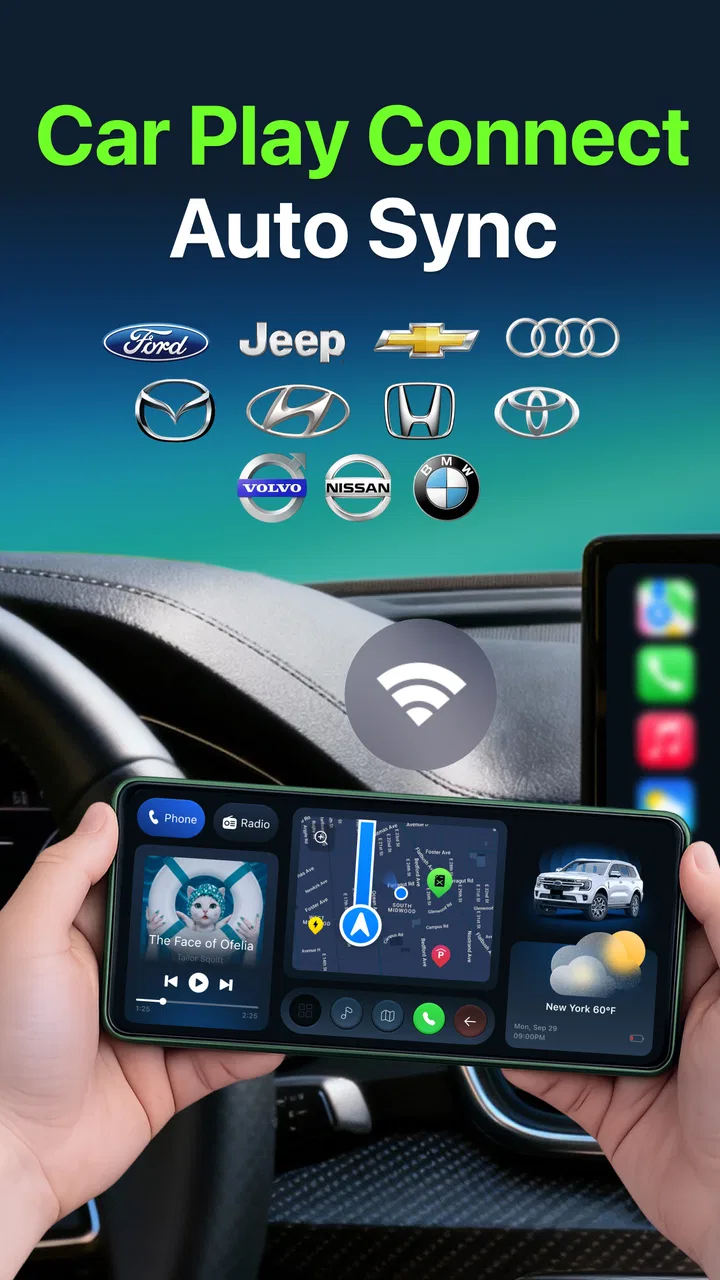
Car Play Connect Auto Sync
- 4.6
- Rating
- 1.00M
- Installs
- Free
- Price
 Analysis by App-foxy
I approached Car Play Auto Sync For Android as a practical driving companion rather than another app to leave installed and forget. Its purpose is straightforward: help an Android phone work with a car dashboard through wireless syncing and automatic connection. That focus makes it interesting for drivers who are tired of reaching for a cable every time they get in the car, but it also means the quality of the experience depends heavily on the phone, dashboard, and connection setup around it.
In my experience, the most important question is not whether the app sounds useful. It is whether your vehicle already supports the kind of wireless dashboard connection this app expects, and whether you want a lighter setup than replacing the car’s entire infotainment system. If the answer is yes, this Auto & Vehicles app can remove a small but repeated annoyance from daily driving. If your car has no compatible dashboard support, the app is unlikely to transform the vehicle by itself.
What I looked for before recommending it
I judged the app using four practical criteria: how quickly it gets ready when I enter the car, how much attention it demands while driving, how well it fits an existing dashboard, and whether its free starting point is enough for ordinary use. Those criteria matter more here than a long feature checklist because the app’s value is concentrated in the connection process.
You May Also Like

 AccuWeather: Weather Radar
AccuWeather Review: A Quick, Clear Forecast for Everyday Decisions
For everyday plans, the best forecast is the one you can understand quickly. AccuWeather makes rain timing, radar, and local conditions easy to act on, with a few trade-offs.

 Hill Climb Racing
Why Hill Climb Racing Still Turns Crashes Into One More Run
A tiny car, a bumpy hill and one more upgrade: Hill Climb Racing keeps resurfacing because its simple chaos makes every near-miss feel personal.

 AliExpress - Shopping App
AliExpress Makes Global Shopping Feel Personal, but Shoppers Bear the Risk
AliExpress turns a global marketplace into a pocket-sized discovery engine. Its reach is useful, its shopping loop compelling, and its trade-offs easy to miss.

 Lords Mobile: Kingdom Wars
Lords Mobile Is a Kingdom-Building Routine, Not a Quick Match
A case-by-case verdict on the building, battles, device demands, and social commitments that make Lords Mobile rewarding for some players and exhausting for others.

 PDF Scanner app - TapScanner
TapScanner Makes Paperwork Easier to Capture, Check, and Share
TapScanner makes scanning with a phone feel less like a rescue operation and more like a dependable step in getting work done. Its capture tools are useful, though not flawless.

 Block Blast!
 Shows How Much a Puzzle Game Can Leave Out
A quiet grid game shows why puzzle players increasingly value instant clarity, repeatable skill and low-pressure play—and where the genre still needs to catch up.
More From Our News Desk
View All News


The developer, MONIQ TAP., CO LTD, presents the app as a free download, with optional in-app purchases ranging from $4.99 to $49.99 per item. That makes the first trial relatively easy for a curious driver, but I would still avoid assuming that every useful capability is included without payment. Before committing to a paid option, I would spend several drives testing the connection in the places where I normally use the car: at home, in a parking garage, and during a quick stop when the phone is already busy with other wireless connections.
Compatibility is the first real decision point. The app supports Android 8.0 and later, which covers many phones still in everyday use. That operating-system requirement is helpful, but it does not guarantee that every handset will behave identically. Wireless dashboard systems can be sensitive to phone settings, battery restrictions, Bluetooth state, Wi-Fi behavior, and the car’s own software. I would therefore treat the first setup as a short compatibility test rather than a promise of instant success.
The app is marked for Everyone, which is appropriate for a driving utility with a simple purpose. That label does not mean I would use it carelessly. Any dashboard connection should be configured while parked, and I would complete pairing, permissions, and display choices before starting a trip. The best automotive app is the one that becomes quiet once driving begins.
The everyday problem it solves
A realistic example is a morning commute. I get into the car with my phone in my pocket, start the engine, and expect the dashboard to become available without searching through settings. With a compatible setup, automatic connection can remove the repeated routine of plugging in a cable, waiting for the dashboard interface, and checking whether the phone recognized the vehicle correctly.
That convenience is small on one trip but meaningful over weeks. It also helps when the phone is being used for navigation and needs to remain accessible without being physically attached. I would still place the phone securely and keep the dashboard view simple. Wireless connection is not a reason to handle the handset while moving; it is a reason to handle it less often.
A less obvious benefit is consistency. When a driver uses a cable, the cable itself becomes another failure point: it can be left at home, worn out, loose, or shared with another device. A wireless workflow removes that particular dependency. The trade-off is that wireless systems introduce their own variables, so a driver should keep a backup plan for important journeys rather than assuming the connection will always recover instantly.
Where the app feels strongest
The strongest part of Car Play Auto Sync For Android is its narrow focus. It is not trying to be a general travel planner, a vehicle maintenance log, or a replacement for every function in a car. Instead, it concentrates on connecting the phone and dashboard with less manual effort. That makes the app easier to evaluate: if your main frustration is the start of the drive, this is the part most likely to matter.
I also like the idea of automatic reconnection for households where the same car and phone are used repeatedly. After the initial setup, a driver should not have to rebuild the entire relationship between the devices every morning. This is especially useful for short trips, where a manual setup can take a disproportionate amount of the journey.
Another useful workflow is to test the app on a quiet local route before relying on it for a long drive. I would start with the phone charged, the vehicle parked, and unnecessary wireless accessories temporarily disconnected. Then I would confirm whether the dashboard recognizes the phone after the engine is restarted. This separates setup problems from problems caused by a busy wireless environment.
The app has also attracted an average rating of 4.5 from around 1.4 thousand ratings, while its review count is 11. I read that combination as encouraging but not conclusive. The rating suggests that many users find the basic idea worthwhile, yet the relatively small written-review sample gives less detail about unusual vehicles, difficult connection environments, or long-term reliability. I would use the rating as a reason to try the app, not as a substitute for testing it in my own car.
Small setup choices that make a difference
My first practical tip is to perform the initial pairing with the vehicle stationary and the phone unlocked. This sounds obvious, but it prevents a common mistake: trying to diagnose a dashboard connection while also preparing to drive. Once the relationship is established, I would restart both the phone’s wireless connections and the car system if the first attempt behaves inconsistently. A clean restart often tells me whether the issue is temporary or structural.
My second tip is to check battery-management behavior after installation. Android may limit background activity for apps that are not used often, and an automatic connection tool needs to be available at the right moment. I would look for the app’s battery setting and avoid overly aggressive restrictions if automatic startup fails. I would not disable every power-saving feature blindly; I would change only what is necessary and then test again.
My third tip is to keep the first few trips deliberately simple. If the phone is simultaneously connected to earbuds, a smartwatch, a hotspot, and the car, it becomes difficult to know which relationship is causing trouble. Testing with fewer active connections gives a clearer baseline. After the app works reliably, I would add accessories back one at a time.
A fourth consideration is the handoff between vehicles. If I regularly drive two cars, automatic connection can become less predictable because the phone has more than one possible destination. In that situation, I would pay attention to which dashboard connects first and whether the unwanted vehicle is nearby. The app may be a great fit for one primary car but less convenient for a household with several competing systems.
Where a different category may fit better
Car Play Auto Sync For Android is not the right answer for every driver. If the car already offers a dependable built-in wireless dashboard system, adding another connection layer may create confusion rather than remove it. In that case, I would first use the vehicle’s native setup and only consider this app if it addresses a specific gap in the existing experience.
Drivers with an older car and no compatible dashboard support should also set realistic expectations. This app is designed around syncing with a dashboard, not around turning a basic stereo into a modern infotainment unit through software alone. A dedicated aftermarket receiver, a phone mount, or a wired connection may be more suitable depending on the vehicle. Those alternatives can involve more installation or hardware cost, but they may provide a more predictable foundation.
A simple phone mount is another legitimate alternative. It avoids dashboard pairing altogether and can be the better choice for a driver who only needs navigation on a screen. The disadvantage is that it may not offer the same integrated dashboard experience, and the driver must manage the phone’s position, charging, and controls separately. I would choose the mount when simplicity matters more than wireless integration.
A wired connection may also be preferable for people who value stability above convenience. Wireless syncing reduces cable clutter, but a cable can be easier to troubleshoot and may keep the phone charging during longer journeys. If I were driving through areas where losing the dashboard connection would be particularly disruptive, I would carry a suitable cable even after adopting the wireless workflow.
There is also a privacy and control question that applies to any connection utility. I would review every permission and system prompt during setup rather than approving everything automatically. I would also avoid experimenting with unfamiliar settings immediately before a trip. The app’s usefulness comes from reducing distraction, so a setup that leaves me uncertain about what is connected defeats the purpose.
The real cost of changing your routine
The financial entry point is attractive because the app is free to install. Still, the real cost of switching is not limited to the purchase screen. It includes setup time, learning how the car reacts, changing battery settings if necessary, and deciding what to do when the wireless connection does not appear. For a driver who gets into one car every day, that learning cost can pay off quickly. For someone who changes vehicles often, it may not.
The optional purchase range also deserves a careful approach. I would not pay immediately after seeing the first successful connection. I would test cold starts, short trips, phone restarts, and the return to the car after leaving it parked. Those situations reveal whether automatic behavior is genuinely dependable. A feature that works once at home but fails after a busy day is not worth judging on the first impression.
The app has reached over 100 thousand installs, which indicates that it is not an obscure experiment with no audience. Its current version is 1.8, and it was released on January 9, 2026. Those details make it sensible to check that the installed version matches the current offering before troubleshooting. They also remind me that a relatively young app can improve over time, but may still have rough edges that a mature built-in system has already resolved.
If I were switching from a cable, I would keep the cable in the glove compartment for the first week. That is not a criticism; it is good planning. It lets me compare the convenience of wireless use with the reliability of the old method and prevents one failed connection from turning into a missed navigation prompt. Once the app proves dependable, the backup becomes occasional rather than essential.
Who should use it and who should skip it
I would recommend Car Play Auto Sync For Android to an Android driver whose car already supports a compatible wireless dashboard connection and who is mainly frustrated by repeated manual pairing or cable use. It is particularly appealing for regular commuters, families sharing one vehicle, and people who make many short trips. In those situations, automatic connection addresses a repeated inconvenience rather than a rare one.
I would be more cautious for drivers who expect the app to add capabilities their car hardware does not support. I would also hesitate if the vehicle already connects perfectly through its own system. There is little value in replacing a reliable native workflow with another layer simply because wireless setup sounds more modern.
People who need guaranteed reliability for professional driving should test it extensively before making it their only method. Delivery drivers, rideshare drivers, and anyone who depends on navigation throughout the day may prefer a wired backup or a dedicated dashboard solution. The app can still be useful, but the correct role may be convenience rather than sole source of connectivity.
For older phones running Android 8.0 or later, I would try the app but pay attention to responsiveness and battery behavior. The operating-system requirement makes installation possible, not identical performance. A newer phone may handle wireless tasks more smoothly, while an older handset may need more patience during setup or reconnection.
My recommendation after weighing the trade-offs
My overall view is positive, with an important condition: Car Play Auto Sync For Android is best understood as a focused convenience tool, not a universal replacement for a car’s infotainment hardware. Its appeal comes from making the beginning of a drive less repetitive. When the phone and dashboard are compatible, wireless syncing and automatic connection can make the car feel more ready when I am.
I would install it for a compatible Android phone and a regularly used vehicle, then give it a proper trial before considering any in-app purchase. I would set it up while parked, test the car after restarts, watch for battery restrictions, and keep a cable nearby during the evaluation period. Those steps cost little and reveal far more than a quick first launch.
The app is free, rated for Everyone, and available for Android 8.0 and later, so the barrier to trying it is modest. At the same time, the optional purchases mean I would make the decision based on repeated daily success rather than the promise of convenience. The key question is simple: does it make your own car connect more reliably with less effort?
If the answer is yes, I can recommend it as a practical addition to an Android driver’s routine. If the answer is no because the vehicle lacks compatible support or already has a better native solution, I would choose a wired setup, a phone mount, or dedicated dashboard hardware instead. For the right combination of phone, car, and expectations, this app earns its place by removing friction from a task I otherwise have to repeat every time I drive.
FAQs for Car Play Connect Auto Sync
01What is Car Play Auto Sync for Android?
Car Play Auto Sync for Android is an app designed to integrate your Android device with your car's infotainment system. It allows you to access and control various features such as navigation, music, and messaging directly from your car's dashboard. This app aims to provide a seamless and safe driving experience by minimizing distractions.
02How do I connect my Android device to my car using Car Play Auto Sync?
To connect your Android device to your car using Car Play Auto Sync, first ensure that your car's infotainment system supports Android integration. Download and install the app from the Google Play Store, then follow the on-screen instructions to pair your device with your car via Bluetooth or USB. Once connected, you can access compatible apps and features on your dashboard.
03Is Car Play Auto Sync compatible with all car models?
Car Play Auto Sync is compatible with a wide range of car models that support Android integration. However, not every vehicle may be supported, especially older models. It's important to check the app's compatibility list or consult with your car manufacturer to ensure that your specific model can work with the app before downloading.
04Does Car Play Auto Sync require a subscription or in-app purchases?
Car Play Auto Sync offers a free version with basic functionalities, but there may be premium features available through in-app purchases or a subscription model. These premium options often include enhanced features such as advanced navigation tools or exclusive app integrations. Be sure to review the pricing details on the app store page before deciding to upgrade.
05What features does Car Play Auto Sync offer to enhance driving safety?
Car Play Auto Sync enhances driving safety by providing voice command capabilities, allowing you to control the app hands-free. It also offers easy access to important functions like navigation and calling, minimizing the need to handle your phone while driving. The app's interface is designed to be intuitive and user-friendly, reducing distractions and helping you focus on the road.
Pros
- Seamless integration with car systems.
- User-friendly interface for easy navigation.
- Supports voice commands for hands-free use.
- Regular updates improve performance.
- Customizable settings for personalization.
Cons
- Limited compatibility with older car models.
- Some features require in-app purchases.
- Occasional connectivity issues reported.
- Voice recognition may misinterpret commands.
- Battery usage can be relatively high.

Car Play Connect Auto Sync
Gallery